Embed online video to minimize distractions
March 24th, 2009
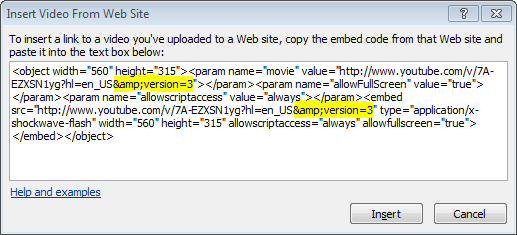
YouTube is riddled with distractions that can take your students’ eyes off the main video you wish them to see.
Read on…
- Tags: video
- Comments(2)
March 24th, 2009
YouTube is riddled with distractions that can take your students’ eyes off the main video you wish them to see.
Read on…
December 22nd, 2008
Frequently, I hear teachers yearn for access to YouTube in their classroom. Yet, I question if this really is a good idea. Below are eight things we need to worry about if YouTube is allowed in the classroom:
Read on…
December 19th, 2008
Some times I think what is hip and cool is not always right for school. The latest trendsetting gadgets are Flip Video’s digital camcorders. It seems like everyone is in love with the Flip. These little camcorders fit in your pocket and have a handy flip out USB connector so you can transfer your movies with ease.
I think the Flip camcorders are a little overhyped. It might be a great little camcorder to carry in your pocket for a night out on the town but we’re not sending our students to shoot video in the clubs. If you’re looking to just record short video clips, many affordable digital cameras can do the job and you’ll be able to use that camera to take great still images too. Here are a few reasons why I don’t flip for the Flip:
Read on…
December 17th, 2008
Not a week goes by without one of my colleagues asking me how to show a YouTube video in class. Because of it’s history of inappropriate content, ranging from pointless to tasteless, YouTube has been blocked in schools across the nation. However, the same content filters that are supposed to be blocking the bad sites are preventing “…teachers from accessing cutting-edge widgets and digital materials that have enormous potential for expanding learning.” [1]
I think it’s time for schools to take another look at YouTube’s use in the classroom. Here are a few reasons why we should let YouTube into our schools:
Read on…
November 4th, 2008
As a huge fan of The Simpsons, I’ve been slowly buying the DVD sets for each season. I have always thought about going through each DVD and pulling out clips that I could use in class. Perhaps I could create a log book to record the timestamp for each clip. I’ve even considered using some DVD ripping software to make a master DVD to hold all my physics-related Simpsons clips. Of course, both of these methods would take a lot of time.
However, I think I’ve found a better solution. More and more content is being put online for viewers to watch on demand. I think the service that does this best is Hulu.com.
Read on…
August 13th, 2008
Have you seen the video where they popped popcorn with cellphones? Seems hard to believe? Well, you’re right. It was created by a marketing company and it’s known as a viral video. Viral videos spread across the web so quickly that they often wind up on regular television news programs. Even the MythBusters have taken on a few of these online gems.
I’ve had some success using viral videos in the classroom. This past year I used two videos; one with my ninth grade physical science students and another with my 12th grade physics students.
With the ninth graders, I showed a video that demonstrated a glow stick being made out of Mountain Dew, baking soda and hydrogen peroxide. The students were thrilled to see the video and even more eager to give this claim a try. So we did! I provided the supplies and off they went. However, none of the students were able to light up their lab tables like the video suggested. With only a few minutes left in class, I told my students that their homework was to go online to find out what went wrong.
In my ten years of teaching, I’ve never had so many students come back the next day talking about yesterday’s lesson. Students rushed into class exclaiming, “I know how they did it” and “it’s fake, it’s fake!” Now that I had their attention, we explored how chemical reactions can give off light and made our own glows sticks that really worked.
In physics we investigated a video that claimed six volt lantern batteries contain 32 AA batteries. My students began to see if this was possible. I gave them the challenge of designing a circuit that used 32 AA (1.5 volt) batteries but still produced an output of six volts. With the help of an online circuit simulator, students were able to design the circuit. However, after measuring the volume of a lantern battery and a AA battery, students realized that the 32 AAs take up more space than one six volt lantern battery has to offer.
Viral video lessons do three important things:
Viral videos are a perfect way to engage students. After all, the videos were designed to capture people’s attention. So the next time you see a video that makes you say, “no way” bring it into class.
April 17th, 2008
When I was a freshman in high school my English teacher (yeah, it was still called English back then) decided to show us a movie version of Romeo and Juliet. However, the movie had one nude scene that my teacher tried to fast-forward through. But, just as you might suspect, her finger on the controls slipped and the whole class got to see a side of Romeo that we did not expect.
Today we can avoid problems like this by ripping and editing DVDs. Ripping is the process of copying audio or video content from a CD or DVD to your computer’s hard disk. Once it is on your computer, you can trim and edit the DVD’s content down to something more appropriate and meaningful for the classroom.
As a physics teacher, I’ve done this when I wanted to show several clips from several different movies in one class period. It would be impractical to spin up each DVD (especially the ones that have previews that are almost impossible to get around). Instead, I put all the clips I want on one disc.
To get started, you’ll need to first BUY THE DVD. Seriously, don’t steal movies. If you use it for class, then buy it for class. If you copy DVDs that don’t belong to you, then you’re basically telling your students that it is okay to plagiarize, cheat and steal.
Next, you’ll need to find software that will rip your DVD. Tekzilla, a technology question and answer show, did a round-up and review of DVD ripping software. (Fast-forward to 7 mins and 29 sec to learn more.) I’ve been using DVD Shrink to rip my DVD’s. Not only does it allow you to copy the DVD to your computer, but DVD Shrink also lets you change the size of the files by recompressing the video or removing the extra audio tracks. It even has the option to trim video clips. So when an actor like Ben Stein does something nutty, you can just cut him out when you make a backup copy of your favorite movie. Ahhhh, now I can watch Ferris Bueller again.
Lastly, you’ll need to burn the new files back to DVD. For this you’ll need a computer that has a DVD burner. Of course, you could also put your clips on a USB flash drive and just play them with something like VLC Media Player.
Happy ripping!
February 14th, 2008
This weekend I had a chance to attend Darwin Day at our local university. It was a fun event and a chance for me to try out Ustream.tv. This site allows you to broadcast video to the web instantly. All you need is a webcam and an Internet connection.
My Wi-Fi connection at Darwin Day wasn’t as strong as I had hoped but I was still able to broadcast the event and Ustream.tv even stored the video for later viewing. Below you can see Brian Bartel (from explodingsink.com) kick-off the event.
You will need to use software to flip the image since the mirror creates… well, a mirror image. I used the trial version of iGlasses from Ecamm.com. For only ten dollars, iGlasses will also allow you to zoom and pan, adjust brightness and change the colors.
If you’re not in the mood to build your own brackets and cut up mirrors, Ecamm sells the Huckleberry. The Huckleberry has durable plastic mounting brackets and an acrylic mirror. It sells for twenty dollars and comes with iGlasses. (I would have purchased this myself if it wasn’t out-of-stock when I needed it.)
Many camcorders will work with Ustream.tv too. A camcorder will give you a high quality video and it’s perfect if you’re planning to broadcast regularly from a fixed location—like a classroom! Below is video stream from Brian Bartel’s class last week on what he calls Combustion Day.
November 4th, 2007
Inspired by the most recent Sony Bravia commercial, I decided to have my physics students create stop-motion videos for a Halloween themed project.
Students were asked to create a video that:
I gave the students a handout with a time line, guidelines, rubric and some suggestions for a successful project. Students created the videos using Windows Movie Maker and uploaded them to Brightcove.tv (YouTube is blocked at our school). I used Jing to provide students with screencasts that explained how to use Movie Maker and Brightcove.tv.
After the videos were created, students used a video analysis program (LoggerPro) to analyze and confirm the acceleration.
I wasn’t sure what to expect when I assigned this project but I was truly shocked by all of the amazing videos that my students produced.
Here is an example:
See all the videos here.
July 25th, 2007
Last week Brian Bartel and I presented at NSTA’s National Congress on Science Education. We discussed the basics of online communication. There were about 25 people at the session but I love the fact that I can still share the information through a variety of ways online.
Zentation appears to be the best tool. Synchronizing was a little quirky at times but the final product was worth the effort. They provide a variety of ways to embed your presentation on your own site. I choose their small Flash-based version below.